Security Deep-Dive · 9 min read · June 2, 2026
TOTP vs. SMS 2FA: Which Should Developers Actually Use in 2025?
If you're deciding between TOTP authenticator apps and SMS-based one-time passwords for two-factor authentication in 2025, the answer is clear: TOTP wins on every security dimension that matters to developers. NIST's updated SP 800-63B guidelines have formally classified SMS OTPs as a restricted authenticator, and real-world SIM-swap attacks — from Twitter CEO Jack Dorsey's 2019 hack to $48.8 million in FBI-tracked losses in 2023 alone [1][3] — make the risks concrete. Here's everything you need to know to make the right call.
- NIST guidance: NIST SP 800-63B explicitly restricts SMS OTPs and mandates organizations that use them to demonstrate mitigating controls; a 2025 update (SP 800-63-4) further sharpens phishing-resistant authentication requirements [1].
- SIM-swap threat: FBI IC3 logged 1,075 SIM-swap complaints in 2023 with losses approaching $50 million, and the FCC adopted mandatory carrier authentication rules (Report & Order 23-95) in late 2023 to combat the fraud [2][3].
- TOTP ubiquity: Google Authenticator has surpassed 100 million downloads; in April 2023, Google added cloud sync backup for TOTP tokens, reflecting mainstream adoption [5].
- Passkeys on the horizon: The FIDO Alliance reports that 69% of users now have at least one passkey enrolled — up from 39% awareness just two years prior — signaling FIDO2/WebAuthn as the next-step replacement [6].
- Developer recommendation: TOTP is the practical, widely-supported middle ground right now; SMS should be a fallback only, and FIDO2 security keys or passkeys should be your long-term target.
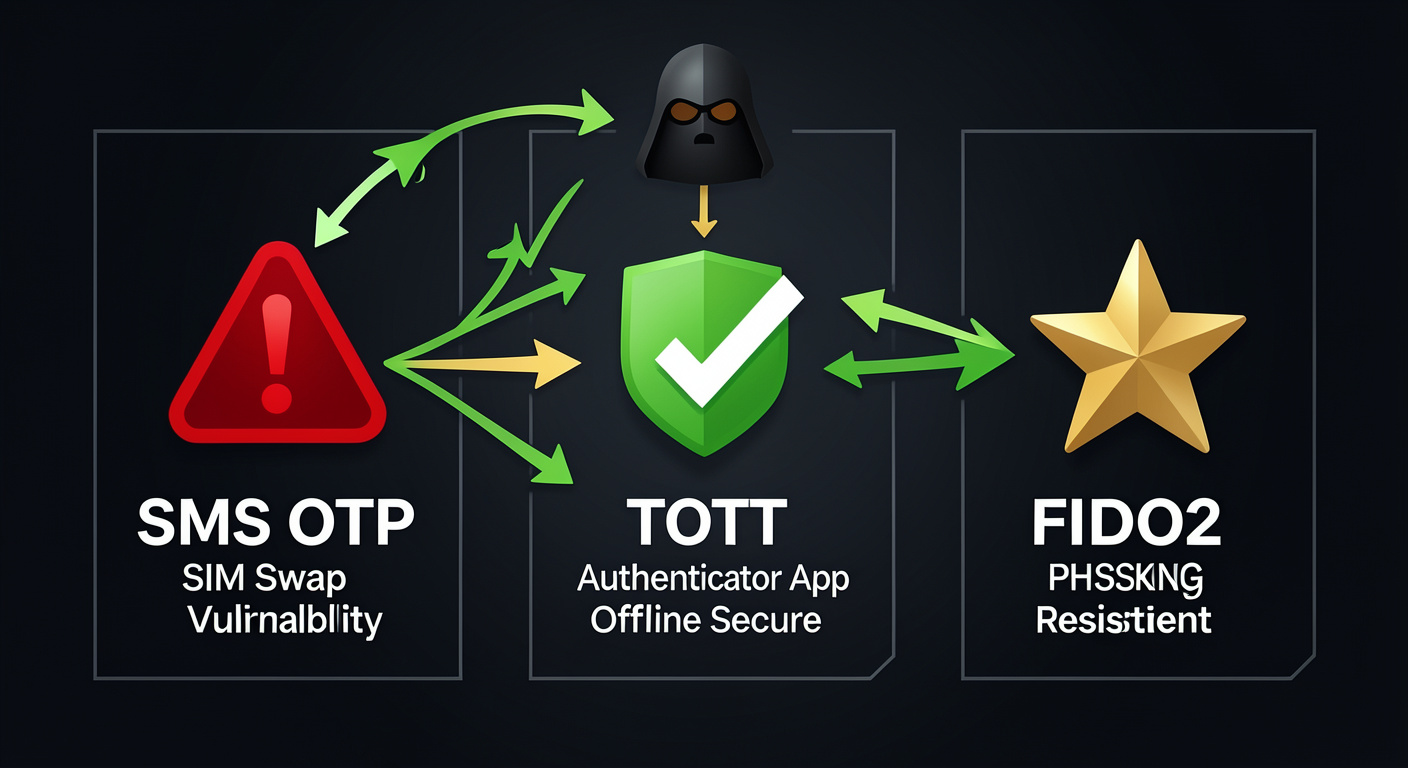
| Factor | SMS OTP | TOTP (Authenticator App) | FIDO2 / Passkey |
|---|---|---|---|
| NIST Status (800-63B) | Restricted ⚠️ | Allowed ✅ | Preferred ✅ |
| Phishing resistant? | No ❌ | Partial ⚠️ | Yes ✅ |
| SIM-swap vulnerable? | Yes ❌ | No ✅ | No ✅ |
| Works offline? | No ❌ | Yes ✅ | Yes ✅ |
| User friction | Low | Medium | Low |
| Carrier dependency | Yes ❌ | No ✅ | No ✅ |
| Ecosystem maturity | Very high | High | Growing rapidly |
TL;DR: In 2025, TOTP authenticator apps are the developer's go-to 2FA method — they're NIST-approved, SIM-swap-proof, and offline-capable — while SMS OTPs are a liability you should deprecate, and FIDO2/WebAuthn passkeys are the emerging gold standard to start building toward now.
Why NIST Has Effectively Deprecated SMS OTPs
The "Restricted Authenticator" Classification
The clearest signal in the federal security landscape is NIST's own language. In SP 800-63B, NIST declared that authenticators leveraging the public switched telephone network — including phone- and SMS-based OTPs — are restricted [1]. This isn't a soft suggestion: under the guidelines, agencies and organizations that continue using SMS OTPs must conduct a risk assessment, implement compensating controls, and provide alternative authenticator options to users [1].
The July 2025 release of SP 800-63-4 sharpened this stance further, modernizing the framework with risk-based evaluation criteria and giving explicit preference to phishing-resistant authenticators [1]. For developers building identity and authentication into their products, this trajectory is unambiguous: SMS OTP is a dead end.
What "Restricted" Means in Practice
Being classified as a restricted authenticator under NIST 800-63B doesn't mean SMS OTP is immediately banned — but it does mean:
- You must document your risk posture if you rely on it.
- You must offer users an alternative, stronger authenticator.
- Future versions of the guidance may eliminate it as an option entirely [1].
For enterprise developers, federal contractors, and any team that adheres to NIST's Digital Identity Guidelines, this is an actionable directive. For everyone else, it's a loud warning shot.
"Authenticators leveraging the public switched telephone network, including phone- and Short Message Service (SMS)-based one-time passwords (OTPs) are restricted." — NIST SP 800-63 FAQ, National Institute of Standards and Technology [1]
The Underlying Vulnerabilities NIST Is Responding To
NIST's concerns aren't theoretical. SMS-based authentication is susceptible to:
- SIM swapping — carriers are socially engineered into porting your number to an attacker's SIM.
- SS7 protocol attacks — weaknesses in the 1970s-era telephony signaling protocol allow interception of SMS messages in transit.
- Real-time phishing — attackers relay the SMS code to a fake login page before the 30-second window expires.
- Malware on device — Android malware can silently read and forward incoming SMS OTPs without user interaction.
None of these attack vectors apply to TOTP codes generated on a local authenticator app, because the secret seed never traverses a carrier network.
The SIM-Swap Threat Is Real, Costly, and Growing
Jack Dorsey and the High-Profile Proof of Concept
In September 2019, Twitter CEO Jack Dorsey lost control of his personal @Jack account — which had 4.2 million followers — for approximately 20 minutes [4]. The attackers didn't breach Twitter's servers or crack a password. They called Dorsey's mobile carrier, used social engineering to convince a representative to port Dorsey's phone number to a SIM card they controlled, and then used SMS-based account recovery to take over the account [4].
The technique is known as a SIM swap (also called port-out scam, simjacking, or SIM splitting) [4]. It exploits a procedural weakness, not a software bug — and that's precisely what makes it so dangerous. No patch can fix a manipulated customer service agent.
The Scale of the Problem in 2024–2025
The Dorsey hack was a preview of a broader epidemic. According to Thomson Reuters, the FBI investigated 1,075 SIM-swap attacks in 2023, with losses approaching $50 million [3]. By 2024, IDCARE reported a 240% surge in SIM-swap cases, 90% of which occurred without victim interaction [3].
In 2024, the FBI reported that victims lost almost $26 million to SIM-swapping scams — with the average individual loss exceeding $26,400 per incident [2]. That figure represents reported losses only; experts note the true rate is likely far higher since most identity fraud goes unreported [2].
The FCC responded in November 2023, adopting Report & Order 23-95, which mandates that wireless providers use stronger identity verification before porting a number and implement customer-facing alerts when a SIM swap is initiated [2]. These rules are a step in the right direction, but they don't eliminate the attack surface — they merely raise the bar for social engineering.
| Year | FBI SIM-Swap Complaints | Reported Losses |
|---|---|---|
| 2022 | ~1,600+ | $72.7 million |
| 2023 | 1,075 | ~$48.8 million |
| 2024 | 982 | ~$26 million |
Source: FBI IC3 / Stingrai Research [2]
"In 2024, IDCARE reported a 240% surge in SIM swap cases, 90% of which occurred without victim interaction." — Thomson Reuters Institute [3]
What This Means for Developers
If you're building a product that relies on SMS 2FA and your users are developers, technical founders, or anyone holding high-value accounts (cloud infrastructure, crypto wallets, CI/CD pipelines), the risk calculus is stark. A SIM swap doesn't require your attacker to be technically sophisticated — just persuasive on the phone. Switching to TOTP or FIDO2 eliminates this entire attack class.
If you're a developer protecting your own accounts, the math is even simpler: SMS 2FA on your AWS root account, GitHub organization, or domain registrar is a single phone call away from compromise.
TOTP: The Developer-Favored Middle Ground
How TOTP Actually Works
Time-based One-Time Password (TOTP), standardized in RFC 6238, works by sharing a secret seed key between the authenticator app and the server at setup time. Every 30 seconds, both sides independently compute an HMAC-SHA1 hash of the seed and the current Unix timestamp, producing the same 6–8 digit code without any network communication [7].
Key technical properties:
- Offline generation — codes are computed locally; no carrier or network dependency.
- Time-limited window — default 30-second validity, with ±1-window tolerance for clock drift.
- Seed never re-transmitted — after initial enrollment QR scan, the secret never leaves the device.
- HMAC-SHA1 base — computationally infeasible to reverse-engineer the seed from observed codes.
This architecture means SIM swapping, SS7 interception, and carrier social engineering are structurally irrelevant to TOTP security.
Adoption Has Reached Critical Mass
Google Authenticator has surpassed 100 million downloads on Android alone [5]. In April 2023, Google added cloud sync backup, allowing users to back up TOTP tokens to their Google account — a major usability improvement that also addresses the "lost phone = locked out" concern [5].
Twilio Authy adds multi-device sync, biometric unlock, and push authentication on top of standard TOTP generation, making it a popular choice for power users and development teams [5]. According to MFA adoption research, the technology sector leads all industries, with 87% of large organizations implementing MFA — and TOTP authenticator apps are the predominant software-based method [7].
The Real Friction Problem — and How to Solve It
TOTP is more secure than SMS, but it introduces a legitimate workflow tax: switching apps, reading a 6-digit code, and typing it before it expires. For developers who authenticate dozens of times per day — logging into staging environments, cloud consoles, package registries, and CI/CD dashboards — this friction compounds fast.
That's exactly the problem our extension at / solves. Rather than tab-switching or phone-picking, you get your TOTP auto-filled directly in the browser from your password manager, keeping you in flow. Pair it with the advice in How to Auto-Fill OTP Codes in Your Browser Without Switching Tabs for a complete workflow.
For a broader look at workflow overhead, The Real Cost of Copy-Pasting 2FA Codes All Day (And How to Stop) breaks down exactly how many minutes per day the average developer wastes on manual OTP entry.
FIDO2 and WebAuthn: The Next Step After TOTP
What FIDO2 / WebAuthn Actually Is
FIDO2 is the umbrella standard developed by the FIDO Alliance and W3C. It encompasses:
- WebAuthn — the browser API that websites use to register and authenticate credentials.
- CTAP2 — the protocol that lets external hardware tokens (like YubiKeys) communicate with the browser.
- Passkeys — synced FIDO2 credentials tied to a platform authenticator (Face ID, Windows Hello, etc.) rather than a single hardware device.
FIDO2 authentication is phishing-resistant by design: the credential is cryptographically bound to the origin domain, so even a pixel-perfect phishing page on a fake domain cannot receive a valid authentication assertion [8]. TOTP does not offer this guarantee — a real-time phishing proxy can relay a TOTP code before it expires.
Adoption Is Accelerating Rapidly
The FIDO Alliance's 2025 research shows that 69% of users now have at least one passkey enrolled, up from 39% awareness just two years prior [6]. Among the top 100 websites, 48% now support passkeys as of May 2025 [6]. In the enterprise, HID/FIDO data indicates approximately 87% of businesses have deployed or are actively deploying passkeys [6].
Bitwarden observed a 550% jump in daily passkey creation in late 2024, and Google made passkeys the default sign-in option for personal accounts [6]. The passwordless authentication market was valued at $18.36 billion in 2024 and is projected to reach $86.35 billion by 2033 [8].
The Practical Path for Developers in 2025
| Phase | Action | Authenticator |
|---|---|---|
| Now (baseline) | Replace SMS 2FA everywhere | TOTP (Authenticator App) |
| Short-term | Add passkey support to your product | FIDO2 / WebAuthn |
| Long-term | Offer hardware security keys for AAL3 | YubiKey / FIDO2 hardware token |
| Never | Keep SMS as primary 2FA | — |
For developers protecting their own accounts, the concrete checklist is:
- Audit your SMS 2FA exposure — list every account using SMS-only 2FA.
- Migrate to TOTP — use Google Authenticator, Authy, or your password manager's built-in TOTP.
- Enable a hardware key — add a YubiKey as a backup for critical accounts (GitHub, AWS, domain registrar).
- Enroll passkeys — on any service that supports it (GitHub, Google, Microsoft, Cloudflare).
- Automate OTP entry — use a browser extension that reads TOTP from your password manager vault without manual copy-paste.
For a complete account-hardening playbook, see the Ultimate Guide to Securing Your Developer Accounts With a Password Manager + 2FA Extension and our breakdown of the 5 Best Password Manager Browser Extensions for Developers in 2025.
Make the Switch Frictionless
The security argument for moving from SMS OTP to TOTP is airtight in 2025 — NIST has restricted SMS, SIM-swap fraud cost Americans tens of millions last year, and TOTP is now mainstream with 100M+ installs of Google Authenticator alone [1][2][5]. The only remaining barrier is workflow friction, and that's a solved problem.
Our browser extension auto-fills TOTP codes and passwords directly from your password manager vault — no tab switching, no squinting at your phone, no race against the 30-second window. It works with all major password managers, supports Chrome and Firefox, and is free to install. If you're serious about developer-grade security without sacrificing speed, it's the last piece of the puzzle.
Frequently asked questions
Has NIST actually banned SMS-based 2FA?▾
Not outright banned, but NIST SP 800-63B classifies SMS OTPs as a 'restricted' authenticator, meaning organizations that use them must document compensating controls and offer users stronger alternatives. The 2025 update (SP 800-63-4) further emphasizes phishing-resistant authenticators, making the trajectory clear.
Is TOTP completely safe from phishing?▾
TOTP is much safer than SMS, but it is not fully phishing-resistant. A real-time phishing proxy can relay a 6-digit TOTP code to the real login page before the 30-second window expires. FIDO2/WebAuthn passkeys are the only mainstream method that is cryptographically bound to the origin domain and therefore truly phishing-resistant.
What happens if I lose my phone and I use TOTP?▾
If you lose your phone, you need a backup — either backup codes saved when you enrolled, a second registered device (Authy supports multi-device sync), or a hardware security key as an alternative 2FA method. Always save your backup codes in your password manager when enabling TOTP on any account.
Can I use my password manager as a TOTP authenticator?▾
Yes. Most major password managers — including 1Password, Bitwarden, and Dashlane — support TOTP generation natively. You can store the TOTP secret seed in your vault alongside the password, and a browser extension can auto-fill both the password and the OTP code without switching apps or tabs.
Should I build SMS OTP into my own product in 2025?▾
If you must offer SMS for accessibility or as a fallback, treat it as a last resort and implement FCC-compliant carrier authentication. Prioritize offering TOTP (RFC 6238) and WebAuthn/passkeys as primary 2FA methods. Given NIST's restricted classification and ongoing SIM-swap fraud losses, launching SMS-only 2FA in 2025 creates both security and compliance risk.
What is the difference between FIDO2, WebAuthn, and passkeys?▾
FIDO2 is the overarching standard from the FIDO Alliance. WebAuthn is the W3C browser API that implements FIDO2 for websites. Passkeys are FIDO2 credentials that sync across devices via your platform (iCloud Keychain, Google Password Manager, etc.), making them more convenient than hardware-only FIDO2 tokens while maintaining phishing resistance.
Sources
- NIST SP 800-63 Digital Identity Guidelines FAQ
- SIM Swap Scam Statistics 2025: $26M Lost & Rising Threats – DeepStrike
- A deep dive into the growing threat of SIM swap fraud – Thomson Reuters Institute
- SIM swap scam – Wikipedia
- 7 Best Authenticator Apps – TeamPassword
- Passwordless authentication in 2025: The year passkeys went mainstream – Authsignal
- Multi-Factor Authentication (MFA) Statistics You Need To Know In 2025 – Expert Insights
- Passkeys and the Future of Passwordless Authentication in 2025 – Jadaptive
Keep reading
Ready to see it for yourself?
Back to home →